Parallel Space - app cloning
- 4.1
- Rating
- 100.00M
- Installs
- Free
- Price

 Analysis by App-foxy
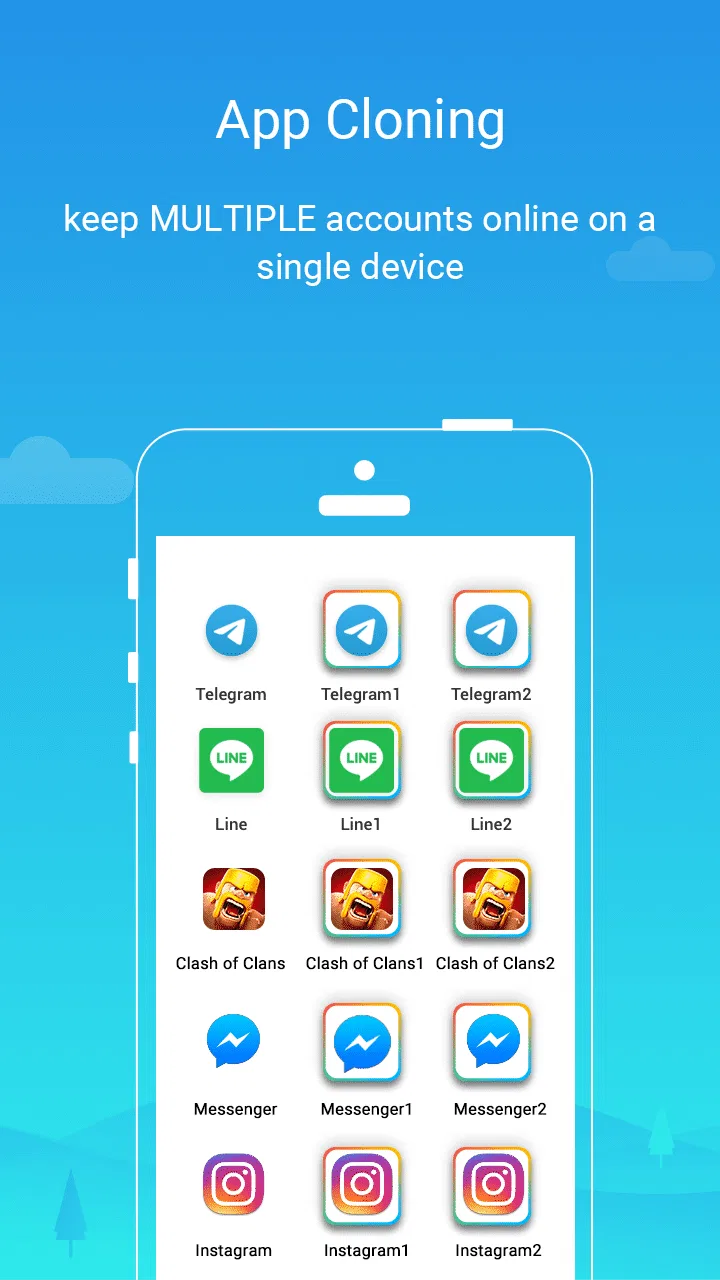
If you have ever wished you could keep two separate logins for the same Android app, Parallel Space is built around that exact problem. Developed by LBE Tech, this free personalization app creates a separate space where you can run another copy of a compatible app on one device. I found the idea easy to understand, but the practical experience depends heavily on which apps you want to duplicate and how much extra management you are willing to accept.
The appeal is immediate for people who separate work and personal accounts, manage more than one social profile, or share a device with a family member. Instead of signing out of one account every time, you can open the cloned version and keep the original app available as well. That sounds simple, and in the right situation it genuinely saves time. It is also important to approach it as a convenience layer rather than a complete replacement for Android’s own user profiles or an app’s built-in account switching.
Parallel Space has been available since February 5, 2016, and its longevity is reflected in its broad adoption: it has passed 100 million installs. Its average rating sits at 4.1 from around 5.1 million ratings, with roughly 36 thousand written reviews. Those figures suggest a well-known tool with a large range of real-world experiences, not a niche utility that only works for a handful of people.
You May Also Like

 AccuWeather: Weather Radar
AccuWeather Review: A Quick, Clear Forecast for Everyday Decisions
For everyday plans, the best forecast is the one you can understand quickly. AccuWeather makes rain timing, radar, and local conditions easy to act on, with a few trade-offs.

 Hill Climb Racing
Why Hill Climb Racing Still Turns Crashes Into One More Run
A tiny car, a bumpy hill and one more upgrade: Hill Climb Racing keeps resurfacing because its simple chaos makes every near-miss feel personal.

 AliExpress - Shopping App
AliExpress Makes Global Shopping Feel Personal, but Shoppers Bear the Risk
AliExpress turns a global marketplace into a pocket-sized discovery engine. Its reach is useful, its shopping loop compelling, and its trade-offs easy to miss.

 Lords Mobile: Kingdom Wars
Lords Mobile Is a Kingdom-Building Routine, Not a Quick Match
A case-by-case verdict on the building, battles, device demands, and social commitments that make Lords Mobile rewarding for some players and exhausting for others.

 PDF Scanner app - TapScanner
TapScanner Makes Paperwork Easier to Capture, Check, and Share
TapScanner makes scanning with a phone feel less like a rescue operation and more like a dependable step in getting work done. Its capture tools are useful, though not flawless.

 Block Blast!
Block Blast! Shows How Much a Puzzle Game Can Leave Out
A quiet grid game shows why puzzle players increasingly value instant clarity, repeatable skill and low-pressure play—and where the genre still needs to catch up.
More From Our News Desk
View All News


Getting started without making the first setup confusing
After installing the app, the first useful step is not to clone everything you see. I recommend deciding on one app and one purpose before adding anything else. For example, if you need a second account for a messaging or social app, start there. A focused test makes it much easier to tell whether the duplicated app behaves properly on your phone.
Parallel Space presents the apps available for adding inside its own interface. You select the app you want to use in the separate space, then open that copy from Parallel Space rather than treating it exactly like the original installation. The original remains where it was, while the second instance is handled through the cloning environment. That distinction is the key idea to understand before you begin.
The application is free to download and is rated for Everyone. Its current version is 4.0.9553 and it requires Android 7.0 or later. In-app purchases range from $0.99 to $9.99 per item, so the basic concept can be tried without paying, while some optional conveniences may involve additional purchases. I would start with the free experience and only consider an upgrade if you regularly use the app and understand what the paid option changes for you.
The first setup can feel less direct than installing an ordinary app because you are not simply creating a shortcut. You are opening a managed copy inside another application. Give the cloned app a moment to initialize, then sign in with the second account. If you accidentally use the same account as the original, nothing is gained, so check the email address, phone number, or username before completing the login.
The first meaningful success
The best test is a small, everyday task: open the original app, confirm that your primary account is still active, then open the duplicate through Parallel Space and sign in to the secondary account. Close both, reopen them separately, and verify that each one returns to its own account. That simple routine tells you much more than merely seeing a second icon on the screen.
A realistic example is someone who uses one social account for friends and another for a small side business. With the original app handling personal messages and the cloned version handling customer conversations, there is no need to log out repeatedly. The benefit is not that either account becomes more powerful; it is that the boundary between them becomes easier to maintain during a busy day.
Another useful workflow is separating a personal account from a volunteer or community account. You can check the second profile when needed without disturbing the notifications, drafts, or session belonging to the first one. I especially like this arrangement for people who dislike juggling passwords and repeated sign-ins, although it still requires sensible account security inside both copies.
For a first-time user, the important habit is to launch the duplicate from the Parallel Space interface until you are certain how it works on your device. Some Android phones may make the cloned app feel like a normal standalone shortcut, while others make the container relationship more obvious. Either way, the app you add is not magically transformed into two independent installations with identical behavior in every situation.
What the separate space actually changes
Parallel Space gives the second app an isolated place to hold its session and app data. That is why two accounts can remain signed in at once. It does not merge the accounts, synchronize their content, or provide a central inbox. If you post, reply, save a draft, or change a setting in one copy, you should treat that action as belonging to that copy only.
This separation is useful, but it also creates a responsibility: remember which version you are opening. A cloned social app can look almost identical to the original, so it is easy to send a message from the wrong profile. I suggest using a simple mental check before posting publicly or contacting someone important. Look at the account name or profile image first, especially when switching quickly.
One non-obvious advantage is that cloning can be more convenient than repeatedly signing out even when the app itself supports multiple profiles. The trade-off is that the app now has two places where data and notifications may appear. If you prefer one unified conversation list, the ordinary account-switching feature inside the original app is usually cleaner.
Why notifications and background behavior can be confusing
Many new users expect the cloned app to behave exactly like the original, including every alert arriving instantly. In practice, background activity can be affected by Android’s battery management, the phone manufacturer’s software, or the way the cloned app operates inside its container. If an important alert does not appear, open the cloned app directly and check the account there rather than assuming the account is inactive.
This is one reason I would not rely on Parallel Space alone for time-sensitive work. It can be excellent for checking a second profile, but a business account that must never miss a message deserves testing over several days before you make it part of your routine. The same caution applies to calls, verification prompts, uploads, and other actions that depend on background processing.
Another point of friction is storage and maintenance. A duplicate app needs its own working space, so adding several large apps can make the phone feel more crowded. The exact impact varies by app and device, but the principle is straightforward: clone only what you genuinely use. When a second account is no longer needed, removing that clone is a sensible way to reduce clutter.
Choosing the right apps to duplicate
Parallel Space is most convincing when the original app does not offer a comfortable account-switching system. Social networking, messaging, shopping, and community apps are natural candidates because people often maintain separate identities or accounts in those categories. The value is lower for an app that already lets you change profiles quickly and keeps everything organized in one place.
Games require more caution. A second game account may be convenient, but game sessions can be sensitive to device checks, updates, sign-in methods, and stored progress. I would test with an account that is not carrying irreplaceable progress before committing to the arrangement. If the game has its own official account management, that route is normally safer and easier to support.
Apps that depend on special hardware, tightly controlled security, or unusual background services may also be less predictable inside a cloned environment. I would not assume that every app can be duplicated just because it appears on the phone. The practical question is not only whether it opens, but whether login, notifications, media access, payments, and updates work as you expect.
A helpful advanced tip is to treat the clone as a separate digital workspace. Keep the secondary account’s purpose narrow, avoid adding unnecessary apps, and periodically review which copies you still need. This prevents the container from becoming a confusing drawer of duplicate icons and makes it easier to identify problems when one app stops behaving normally.
Privacy, account boundaries, and everyday discipline
Running two accounts on one phone does not remove the need to protect either account. Use the security controls offered by the original service, keep recovery details current, and be careful when handing your phone to someone else. A cloned app can make account switching easier, but it does not make a private account invisible to anyone who can open the container.
I also recommend separating personal and professional activity by purpose, not just by login. If you use one copy for work, avoid saving personal drafts or sending private files from it. The visual similarity between both versions means that a quick tap can still cause an embarrassing mistake. A consistent routine—checking the profile before sending and closing the app after finishing—does more for safety than cloning alone.
There is a subtle trade-off with support. When an app behaves incorrectly, you may need to determine whether the problem belongs to the original service, the cloned copy, Android, or Parallel Space itself. Troubleshooting is therefore less direct than with a normal installation. Reproducing the issue in the original app is a useful first test: if the original works and the clone does not, the container is part of the problem.
How it compares with Android profiles and built-in account tools
Android’s own user profiles, when available on a device, are a broader form of separation. They can divide apps, settings, and personal spaces at the system level, but switching users may feel excessive when you only need a second account for one or two apps. Parallel Space is more focused: it aims to duplicate selected apps without asking you to maintain an entirely separate phone environment.
Built-in multi-account support is usually the smoothest choice when an app provides it. One installation, one update path, and one notification system are easier to manage. I would choose the official account switcher for frequent switching inside the same service, especially when the app maintains a clear profile selector. Parallel Space becomes more attractive when that feature is missing or awkward.
Some phones also include manufacturer-specific cloning tools. Those can integrate more naturally with the device, which may help with shortcuts, notifications, and system settings. On the other hand, they are not available on every Android phone, and their behavior differs between manufacturers. Parallel Space offers a recognizable alternative for users who want a dedicated cloning app rather than a feature tied to one phone brand.
The right choice depends on the size of the separation you need. For two accounts in one app, Parallel Space can be practical. For a complete work-and-personal split, a system profile may be more appropriate. For one service with excellent built-in profile switching, cloning may simply add unnecessary complexity.
Who will appreciate it, and who should skip it
I would recommend trying Parallel Space if you regularly maintain two accounts, your phone lacks a useful native cloning feature, and you are comfortable opening the second copy through a separate interface. It is particularly helpful for people who need a quick boundary between personal and professional communication without carrying a second device.
I would be more cautious if you need guaranteed real-time notifications, depend on highly sensitive authentication, or dislike managing duplicate app data. People who want a completely separate user environment should look at Android’s profile options instead. Likewise, anyone who only switches accounts occasionally may find that the service’s own sign-out or profile tools are simpler.
The app’s large user base makes it easy to understand why the concept remains popular, but popularity does not remove the individual compatibility question. My advice is to test one non-critical account first, use it through a normal day, and pay attention to alerts, sign-in persistence, and the actions you perform most often. That short trial gives you a more useful answer than assuming every app will behave identically.
My final take after using the workflow
Parallel Space solves a narrow problem in a direct way: it lets me keep another account for a compatible app on the same Android phone. When I need that separation, the convenience is real. I can leave the main account alone and open the secondary one without repeatedly signing out, which makes everyday account management less frustrating.
Still, I would not install it just because having duplicate apps sounds useful. The extra layer can bring confusion around notifications, storage, updates, and identifying the active account. Its strongest use is deliberate, limited cloning—not turning the phone into a collection of copies. Start with one app, confirm that the second account works reliably, and remove anything that does not earn its place.
Overall, I see this free personalization app as a practical middle ground between built-in account switching and a full Android user profile. LBE Tech has kept the central idea easy to grasp, while the real quality of the experience depends on your phone and the apps you place inside it. If your goal is two clearly separated accounts for a specific everyday task, Parallel Space is worth trying; if you need system-wide separation or flawless background reliability, choose a more integrated option.
FAQs for Parallel Space - app cloning
01What is Parallel Space and how does it work?
Parallel Space is an app that allows users to clone and run multiple accounts of the same app simultaneously on a single device. It creates a parallel environment where you can log in with different credentials, ensuring that your personal and work accounts stay separate and organized.
02Is Parallel Space safe to use?
Yes, Parallel Space is generally safe to use. It does not require root access and is designed to protect user privacy. However, it’s important to download it from reputable sources like the Google Play Store or Apple App Store to avoid counterfeit versions that may compromise security.
03How much storage does Parallel Space require?
Parallel Space requires a moderate amount of storage, typically around 20 MB for the app itself. However, additional storage will be needed for the cloned apps and their data. It's advisable to have sufficient space on your device to ensure smooth operation of both the app and the cloned applications.
04Can I clone any app using Parallel Space?
Most apps can be cloned using Parallel Space, including popular social media and messaging apps. However, some apps may have restrictions or compatibility issues due to their design or security settings. It's best to check the app's compatibility with Parallel Space before proceeding with cloning.
05Does using Parallel Space affect device performance?
Running multiple instances of apps via Parallel Space can impact device performance, particularly on older or low-spec devices. Users might experience slower speeds or increased battery consumption. It's recommended to monitor device performance and close unused apps to optimize functionality.
Pros
- Allows multiple accounts on one device
- User-friendly interface
- Supports most popular apps
- Customizable themes
- Lightweight and efficient
Cons
- Contains ads in the free version
- Limited features without subscription
- May drain battery quickly
- Occasional app crashes
- Requires many permissions

Parallel Space - app cloning
Gallery